What Is an STL File? The STL File Format Explained
What is an STL file? It is a 3D model saved as a plain list of flat triangles, each with three corner points and a normal that marks the outside. That is all it holds: no units, no colour, no textures. Because it is so simple, nearly every slicer and CAD program can read and write it, and STL is still the everyday file format of 3D printing.
Updated 2026-11-16
What is an STL file made of?
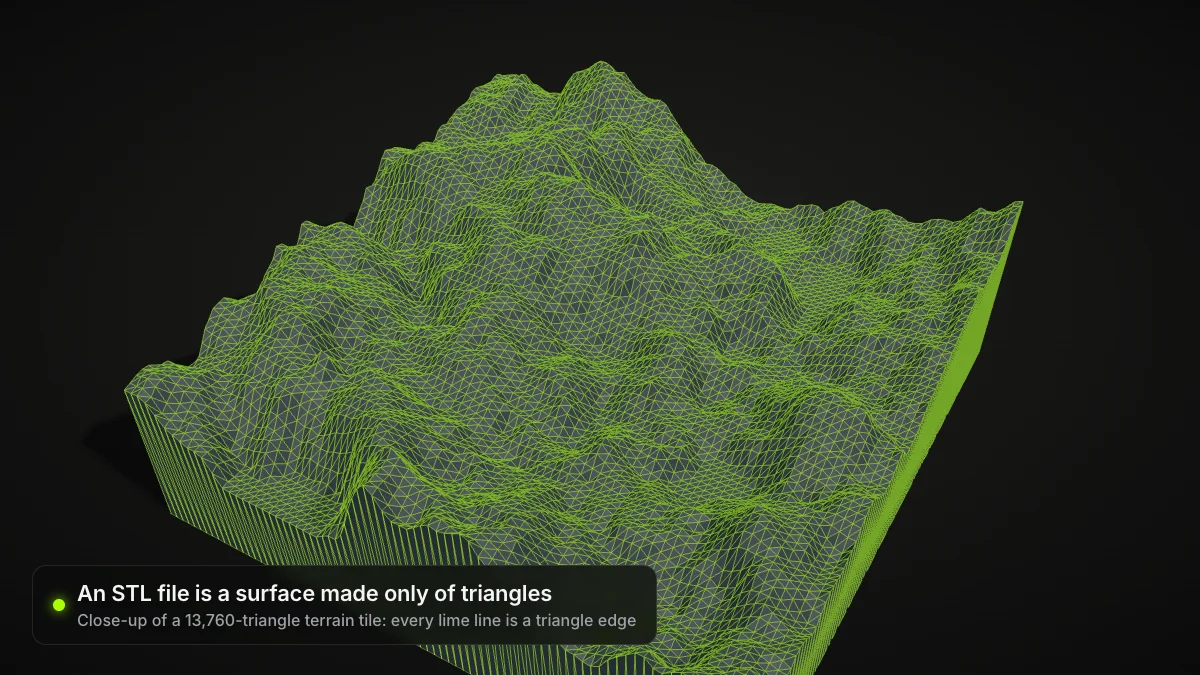
An STL file describes only the outer skin of an object. The surface is broken into triangles, called facets, and the file lists them one after another. A sphere, a gear and a figurine all end up as the same kind of data: thousands of flat triangles that together approximate the shape. There are no solids, holes or features, only the surface.
The Library of Congress format description gives the name as STereoLithography and lists Standard Triangle Language and Standard Tessellation Language as alternative readings. Files use the .stl extension, and the media type model/stl was registered with IANA in March 2018.
Where the STL format came from
STL comes from 3D Systems, the company Chuck Hull co-founded in 1986 to commercialise stereolithography. Its first printer, the SLA-1, came out in 1987 (3D Systems timeline). Dates for the format itself differ slightly: the 3D Systems learning center says Hull invented it in 1986, while the Library of Congress says it was first documented in the company's StereoLithography Interface Specification in 1988. It was built for machines that cure resin layer by layer and became the de facto exchange format for rapid prototyping in the 1990s.
What STL files store: facets, normals and vertices
Every facet in an STL file has two parts:
- A normal: a vector of length 1 that points out of the solid, away from the material.
- Three vertices: the x, y and z coordinates of the triangle's corners, listed counterclockwise when you look at the object from outside. This is the right-hand rule, and it means the corner order and the normal agree on which side is "out".
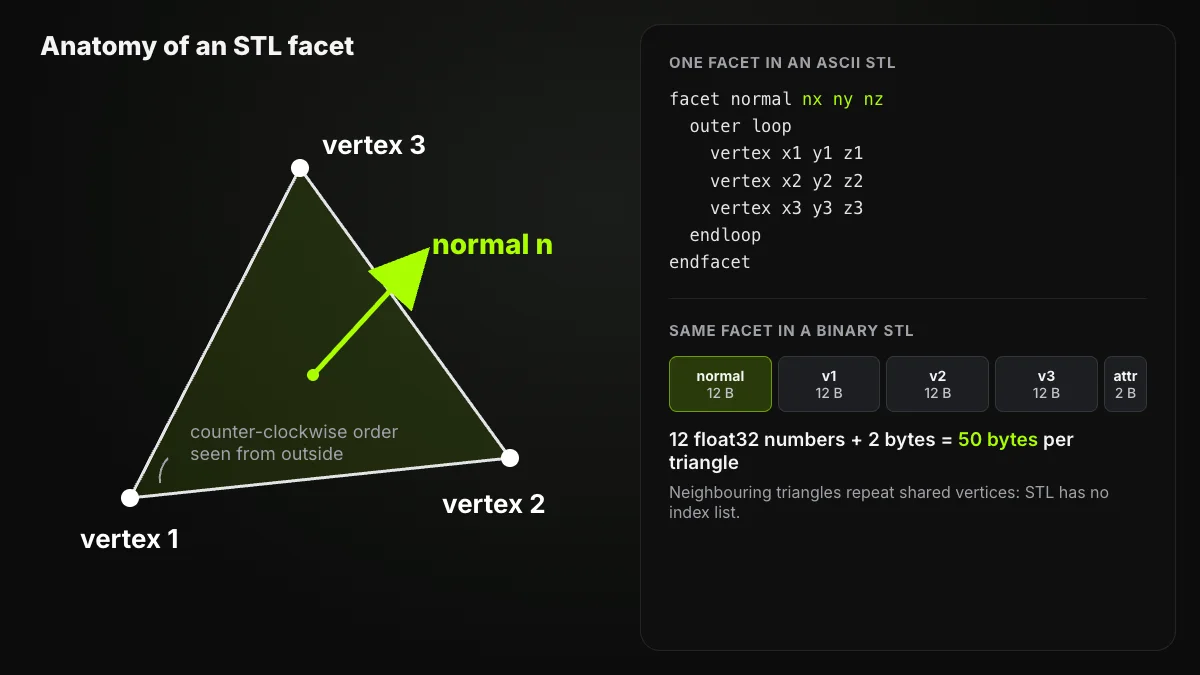
Facets do not share a vertex list: each one repeats its own three corners, so a point where six triangles meet is written six times. That redundancy is one reason STL files grow quickly.
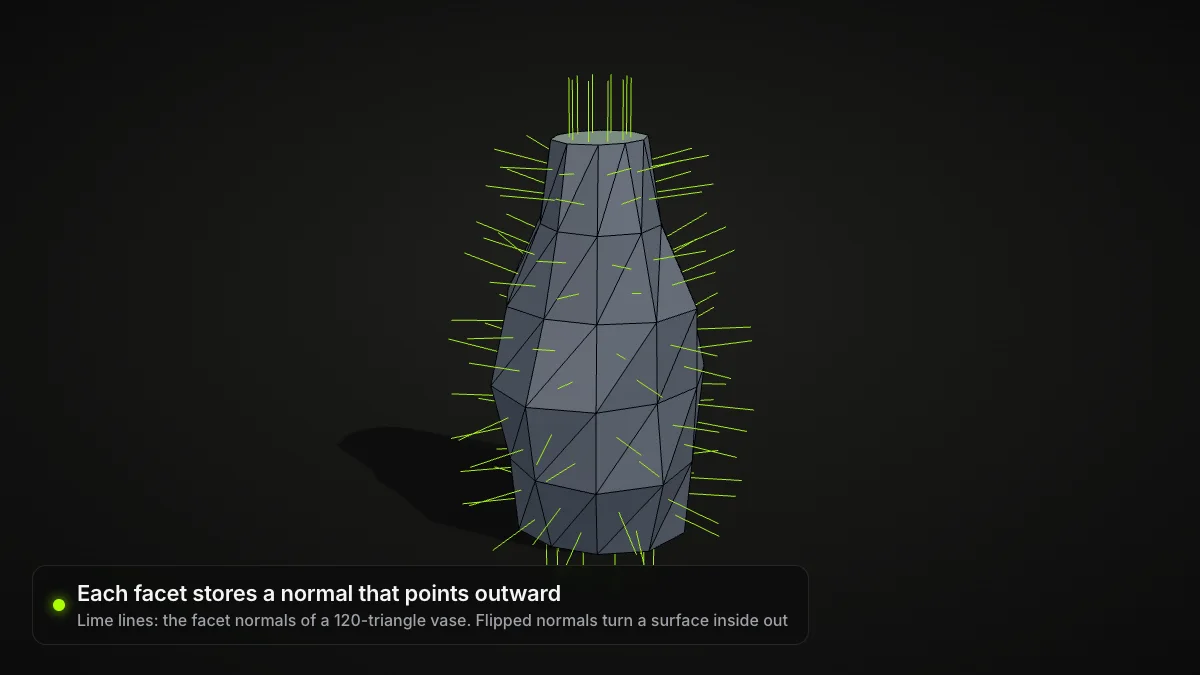
Here is a complete ASCII STL with one triangle lying flat on the build plate. The corners run counterclockwise seen from above, so the normal points straight up along +Z:
solid example
  facet normal 0 0 1
    outer loop
      vertex 0 0 0
      vertex 10 0 0
      vertex 0 10 0
    endloop
  endfacet
endsolid example
ASCII vs binary STL
The STL file format comes in two encodings that hold the same information.
ASCII STL is text. It starts with solid, wraps each triangle in facet normal … endfacet, puts the three corners between outer loop and endloop, and closes with endsolid. Any text editor can open it.
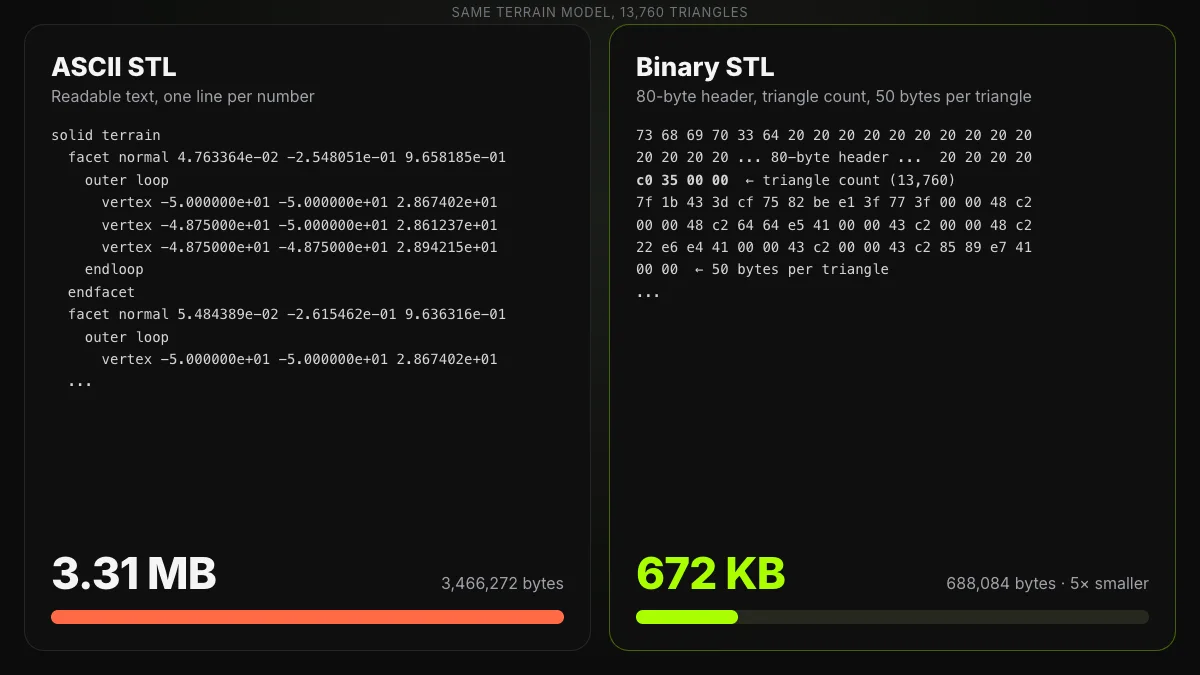
Binary STL follows a fixed layout (Library of Congress, binary STL):
| Part | Size | Content |
|---|---|---|
| Header | 80 bytes | Free text, usually ignored |
| Triangle count | 4 bytes | 32-bit unsigned integer, little-endian |
| Each triangle | 50 bytes | 12 × 32-bit floats (normal + 3 vertices) = 48 bytes, then 2 attribute bytes |
So a binary STL is always exactly 84 + 50 × N bytes, where N is the number of triangles:
| Triangles | Binary STL size |
|---|---|
| 1 | 134 bytes |
| 13,760 (the terrain above) | 688,084 bytes (672 KB) |
| 100,000 | 5,000,084 bytes (4.8 MB) |
| 1,000,000 | 50,000,084 bytes (47.7 MB) |
ASCII has no fixed size, because it depends on how many digits the exporter writes. Our terrain, written with six decimal places, came to 3,466,272 bytes as text: about 252 bytes per triangle and five times the binary file. That is why binary is the more common variant, and why the Library of Congress notes that many STL files would be "unmanageably large" in ASCII.
Which kind do I have?
Open the file in a text editor. If you see solid followed by lines of facet normal and vertex, it is ASCII. If it looks like random symbols, it is
binary, and its size in bytes should equal 84 + 50 × the triangle count your
viewer reports.
What an STL file does not store
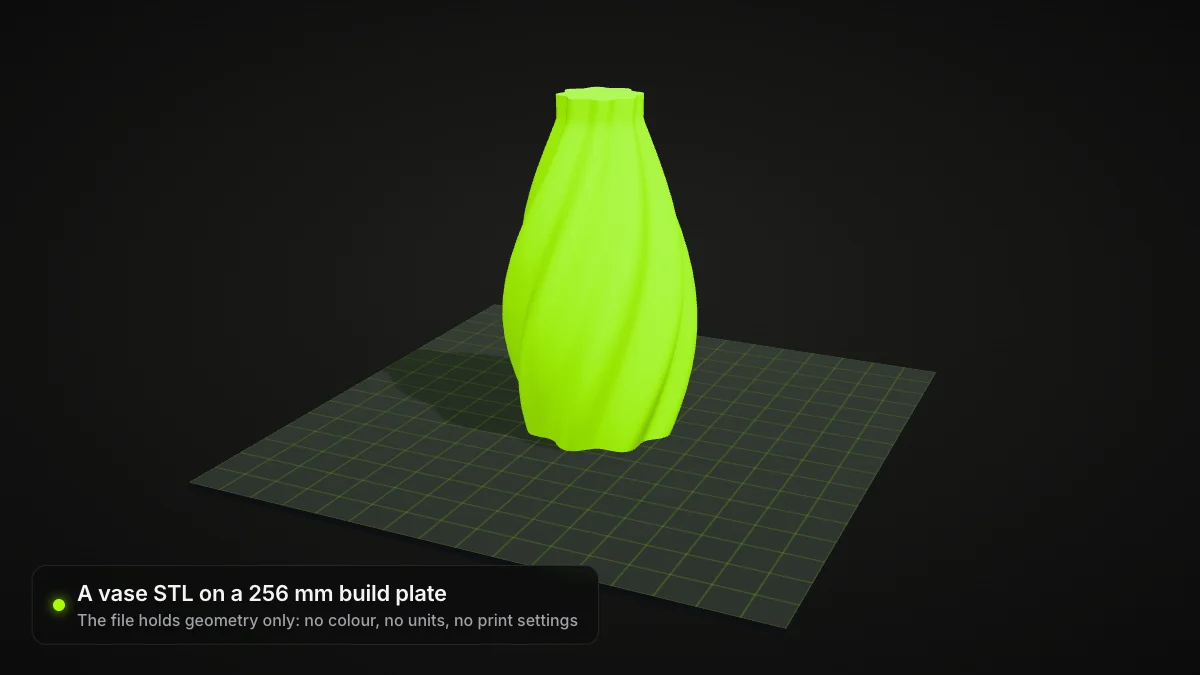
- Units. STL files contain no scale information, so the units are arbitrary (Wikipedia). A slicer that assumes millimetres will load a part modelled in inches 25.4 times too small.
- Colour and textures. According to the Library of Congress there is no standard support for either. Two vendors packed colour into the spare attribute bytes in incompatible ways, so don't rely on it.
- Structure and settings. No object names, materials, supports, print settings or thumbnails. A binary STL cannot even mark where one part ends and the next begins.
Watertight meshes and why slicers care
A slicer cuts the mesh into horizontal layers and must decide, on every layer, what is inside and what is outside. That only works on a closed surface, usually called watertight or manifold: every edge belongs to exactly two triangles. The STL rules state it as the vertex-to-vertex rule, under which each triangle shares a full edge with each of its neighbours.
Exports from CAD programs and 3D scans do not always meet it: the Library of Congress cites a 2003 analysis in which CAD tessellation often ended with gaps and holes that leave open loops. A missing patch leaves open edges, a flipped facet turns its normal inward, and two shells can cut through each other. The slicer then guesses, leaves a layer incomplete or flags the model.
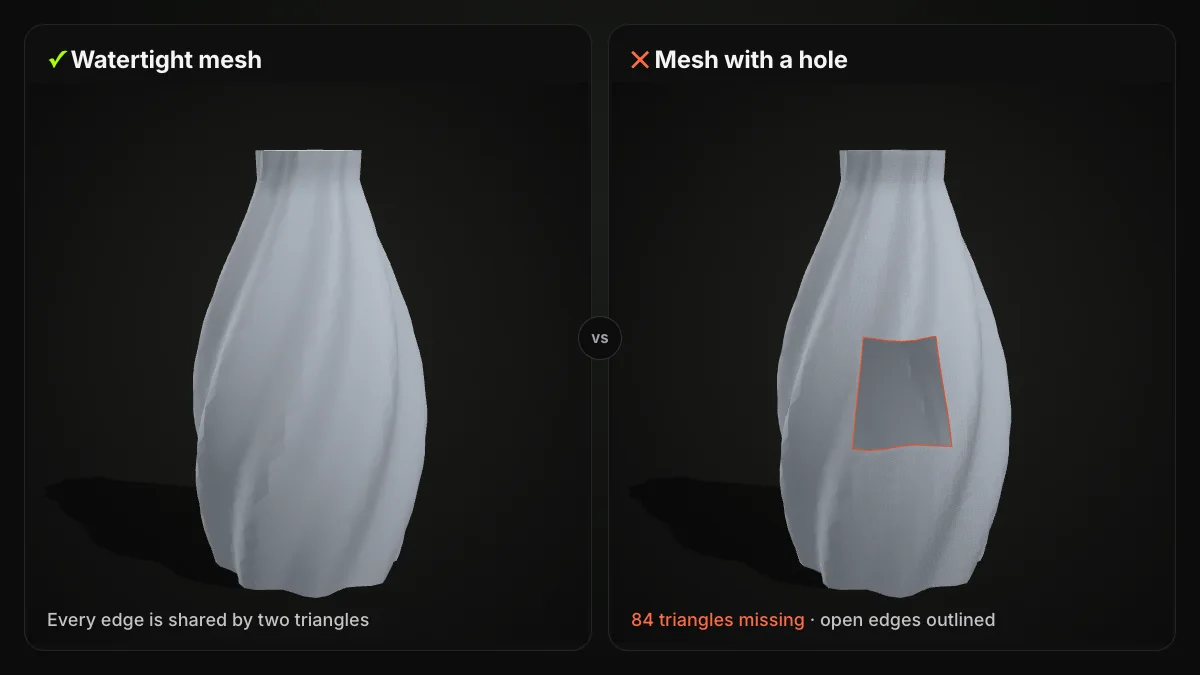
For anything beyond a tiny gap, repair the mesh before slicing. Our guide on how to edit STL files walks through the tools.
Resolution: triangle count vs file size
Flat triangles cannot match a curve exactly, so every STL export is an approximation. CAD programs decide how close it gets with settings such as chord tolerance (how far a facet may stray from the true surface) and angle control, and 3D Systems notes that changing them changes the resolution of your STL.
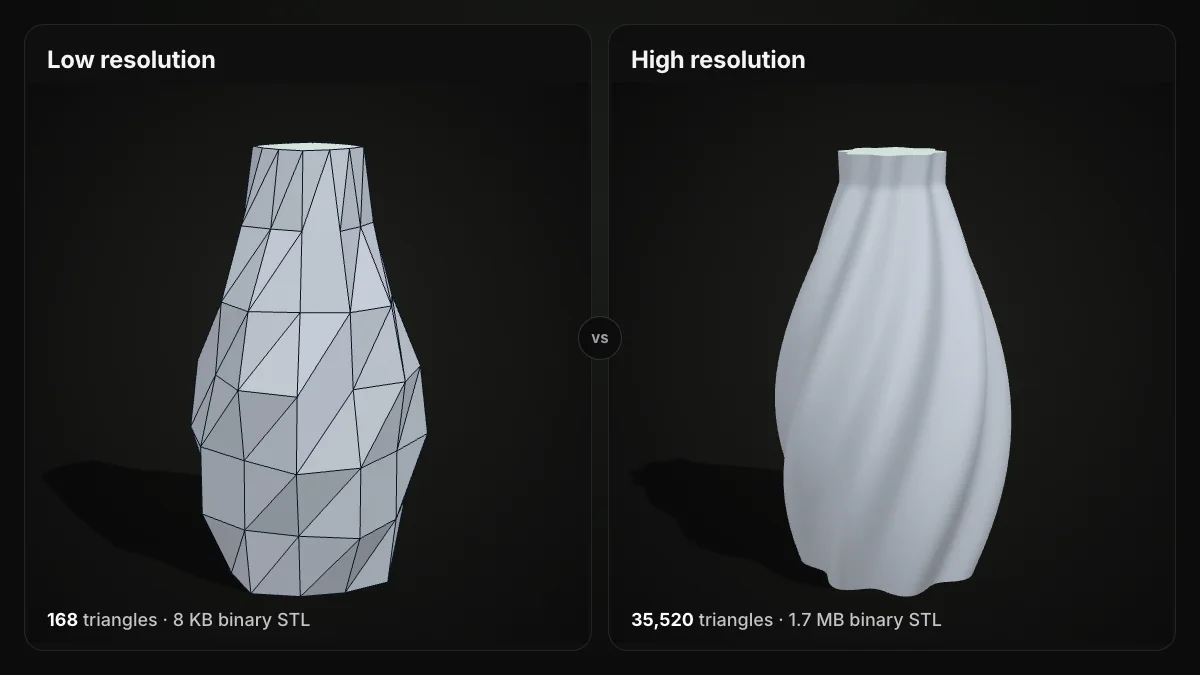
Too coarse, and facets show up as flat bands on the print; too fine, and the file swells with detail no nozzle or resin layer can reproduce. Refine until facets stop being visible at your print scale. Our STEP to STL converter offers the same trade-off as a Standard / Fine switch: Fine gives smoother curves and holes with more triangles and a bigger file.
How to open STL files, edit them and convert them
Open or view. Bambu Studio, PrusaSlicer and UltiMaker Cura all import STL directly. For a quick look without installing anything, drop the file into our online STL viewer. It runs in your browser with three.js, shows the file size and triangle count, and never uploads the file.
Open an STL file in your browser
Free, no sign-up. Files up to 200 MB stay on your device. Rotate, zoom, check the triangle count, and save as GLB, STL, OBJ or FBX.
Edit. An STL has no feature history, so editing means working on the mesh itself; how to edit STL files compares Blender, Tinkercad, Fusion and slicer tools.
Make one. Export from CAD, convert another format or start from a photo, as covered in how to make STL files.
Convert. Send an STL to 3D software as OBJ with the STL to OBJ converter, or turn a CAD part into a printable mesh with STEP to STL.
When to use 3MF, OBJ or STEP instead
| If you need | Use | Why |
|---|---|---|
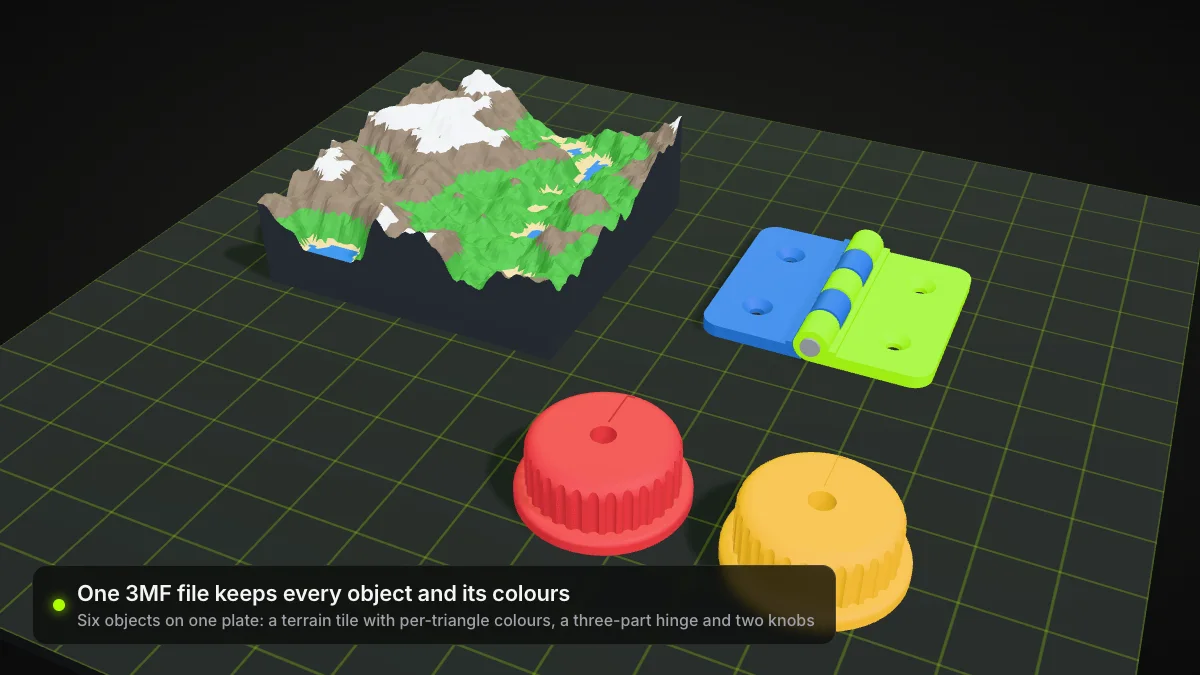
| Units, colours or several named parts in one file | 3MF | Stores a unit, materials and separate objects; see 3MF vs STL |
| Texture coordinates for rendering | OBJ | Can carry UV coordinates; colour and textures live in a companion .mtl file (LoC); see STL vs OBJ |
| A CAD part you will keep editing | STEP | ISO 10303-21 exchange format for product data; mesh it to STL only when it is time to print |
| The simplest file any print tool accepts | STL | Geometry only, read almost everywhere |
Summary
So what is an STL file? A list of triangles with normals, stored as text or as a compact binary layout of 50 bytes per triangle, with no units, colour or structure. Keep the mesh watertight, export at a resolution your printer can actually show, and reach for 3MF, OBJ or STEP when you need what STL leaves out.
Frequently asked questions
What is an STL file used for?
Mainly 3D printing. A slicer reads the triangle surface in the STL and turns it into layers and toolpaths. STL is also a standard export from CAD programs and 3D scanners, and a common download format for printable models.
What does STL stand for?
STL is short for stereolithography, the resin printing process 3D Systems built it for. You will also see Standard Triangle Language and Standard Tessellation Language, which the Library of Congress lists as alternative names.
How do I open an STL file?
Import it into a slicer such as Bambu Studio, PrusaSlicer or UltiMaker Cura, or drop it into a browser viewer like our free STL viewer, which shows the model and its triangle count without uploading the file. A text editor opens ASCII STL files too, but you only see numbers.
What is the difference between ASCII and binary STL?
Both store the same triangles. ASCII writes them as readable text; binary uses an 80-byte header, a 4-byte triangle count and 50 bytes per triangle. Binary is the more common variant because it is much smaller: in our test the ASCII copy of a 13,760-triangle model was five times larger.
Does an STL file have units or colour?
No. STL stores coordinates without a unit, so the program that opens it has to assume or ask for one, typically millimetres or inches. The standard has no colour or texture either. If you need those, save the model as 3MF instead.
Why does my slicer say the STL has errors?
Usually because the mesh is not watertight: it has holes, open edges, flipped normals or shells that cut through each other. The slicer needs a closed surface to tell inside from outside. Repair the mesh in a mesh editor or your slicer, then slice again.