How to Edit STL Files: 6 Methods and Tools
To edit an STL file, open it in a mesh editor such as Blender, Tinkercad or Autodesk Fusion, make the change, and export it as STL again. Small jobs (scale, rotate, cut in two) can be done directly in your slicer. This guide shows which tool fits which edit.
Updated 2026-11-16
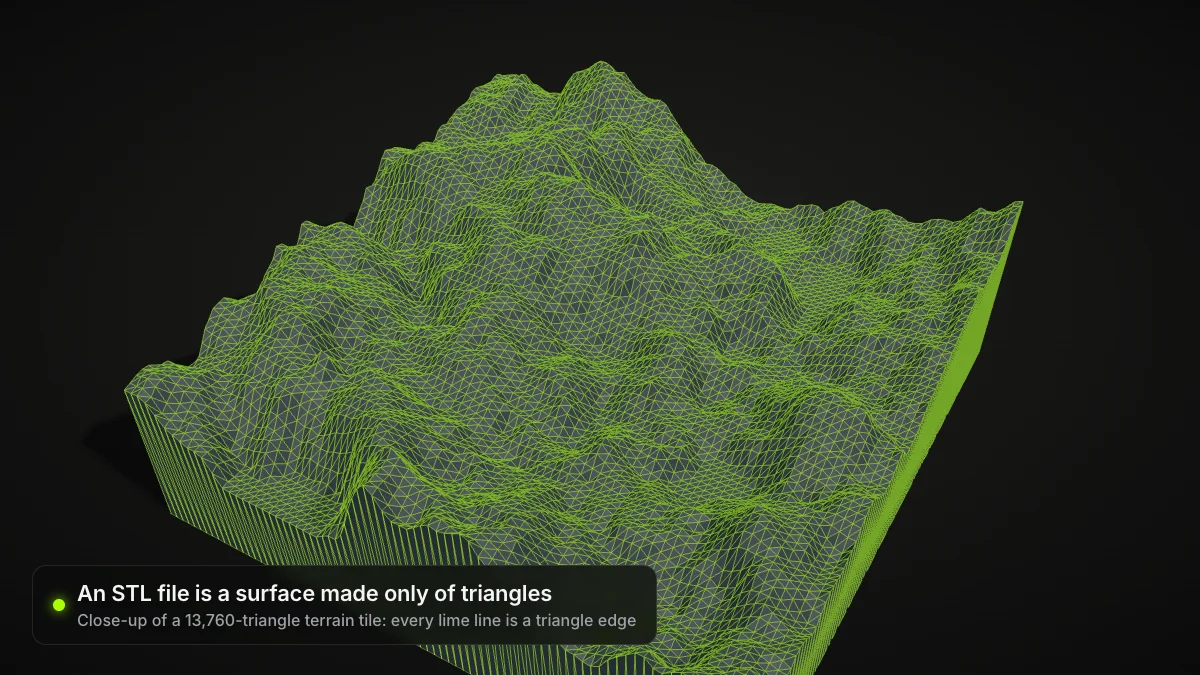
Knowing how to edit STL files saves a lot of reprinting. An STL is a plain triangle mesh, so editing it means working on a surface, not on a parametric design. Pick the lightest tool that does the job: the slicer for size and cuts, Tinkercad for simple additions, Blender or Fusion for real mesh work.
Which method for which edit
| Edit you need | Easiest tool | Notes |
|---|---|---|
| Scale, rotate, move | Your slicer | No export needed |
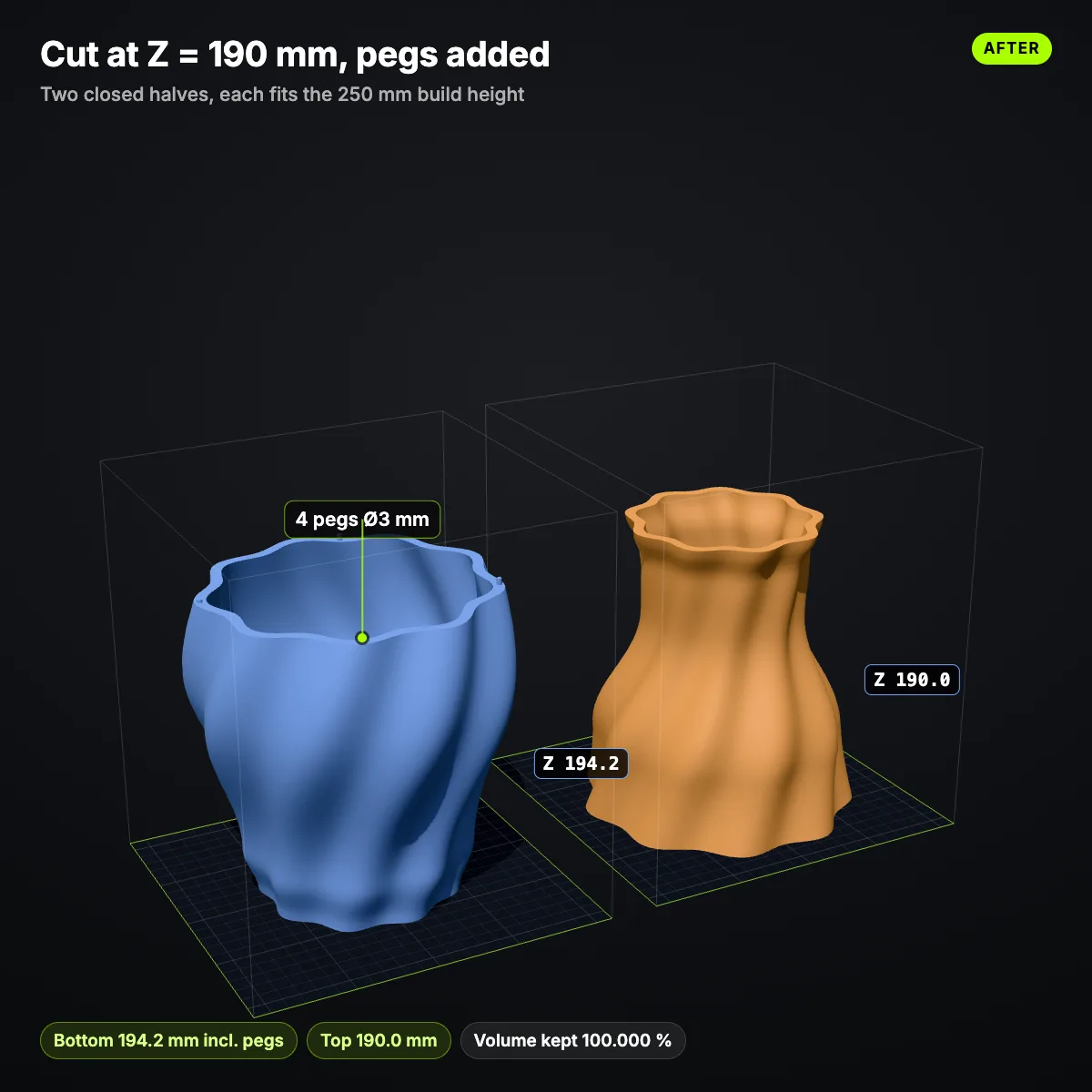
| Cut into two printable parts | Slicer Cut tool, Blender | PrusaSlicer can add pins and snap connectors |
| Add a base, hole or text | Tinkercad | Combine shapes, then export |
| Sculpt, smooth, merge meshes | Blender | Full mesh editing |
| Edit like a CAD model | Fusion | Mesh workspace, personal-use license |
| Change the file format first | A converter | See below |
Step 1: Check the file before you edit
Open the STL in a viewer or your slicer and look at three things: size (is it in the range you expect?), orientation (which side is the bottom?) and obvious holes in the surface. Our GLB viewer opens STL too, and shows the triangle count.
Back up first
Keep the original STL untouched and save every edited version under a new name. Mesh edits cannot be undone once exported.
Common problems when you modify STL files
- Wrong size: STL carries no unit. Compare the bounding box in your slicer with the real object before you change anything.
- Faceted curves: an STL is made of flat triangles, so a low-poly file will look faceted. You cannot add detail that is not in the mesh; remodel or regenerate the model instead.
- Edit does nothing in the slicer: you probably exported without applying modifiers, so the original geometry was written.
- Huge files: very dense meshes are slow in every editor. Reduce the triangle count with a Decimate-style tool before you start sculpting.
Step 2: Edit an STL in Blender
Blender's manual lists STL under File > Import / Export, with import and export built in to current versions (Blender manual: STL).
- Choose File > Import > STL (.stl). Set the scene unit option if the size looks wrong.
- Switch to Edit Mode to move vertices, extrude, or delete faces. Use modifiers such as Boolean or Decimate for cuts and lower triangle counts.
- Choose File > Export > STL (.stl). The manual lists options for Selection Only, Scale and Apply Modifiers; turn on Apply Modifiers so your Boolean and Decimate results are written.
Fix and check the mesh
Blender's importer has a Validate Mesh option that checks for corrupt data. For a mesh with real holes, close them in Edit Mode before exporting.
Step 3: Edit an STL in Tinkercad
Tinkercad's Help Center describes the flow: click Import in the top right and pick your STL, change it with shapes (for example a hole shape to drill, a box to add a base), then use Export and choose STL, OBJ or GLTF (Tinkercad export help). Imported STLs become one solid, so you cut and add around them rather than reshaping individual triangles.
Step 4: Edit an STL in Autodesk Fusion
Fusion has a Mesh workspace and is Autodesk's recommended path after Meshmixer. Autodesk says STL export remains available on the free personal-use license, which is for non-commercial projects and allows 10 editable documents at a time (Autodesk).
Step 5: Do simple edits in your slicer
Most slicers scale and rotate. PrusaSlicer also has a Cut tool (press C) that splits a model at any angle and can create plug, dowel and snap connectors (Prusa Knowledge Base). For oversized models this avoids Blender entirely.
Step 6: Convert to another format when needed
Some editors handle OBJ better than STL, and some files arrive as GLB. Our browser converters, such as GLB to STL and STL to OBJ, run locally with three.js, so your file is never uploaded. They convert only; they do not repair meshes.
Need your STL as OBJ?
Convert in your browser, no sign-up, no upload.

Units
glTF and GLB use metres, while slicers read STL as millimetres. If a converted model looks tiny in your slicer, scale it by 1000.
Retired tools
Microsoft's deprecated-features page says 3D Builder is no longer supported and was removed from the Microsoft Store as of July 2024 (Microsoft Learn). Autodesk says Meshmixer is no longer in development and will not be supported (Autodesk Marketplace). Both may still run if you already have them, but choose Blender or Fusion for new projects. Information checked in November 2026.
If you have no STL to start from
Instead of fixing a bad file, you can make a new one. Our guide to making STL files covers the options, and Image to STL creates a printable model from a single picture.
Skip the editing: make an STL from a photo
AI turns one image into a textured 3D model in about a minute; download STL, GLB, OBJ or USDZ. Sign up free and try image to 3D once for free.
Frequently asked questions
How do I edit an STL file?
Import the STL into a mesh editor (Blender, Tinkercad, Autodesk Fusion), change the geometry, then export as STL. For scale, rotation or a straight cut you can stay in the slicer, for example the PrusaSlicer Cut tool.
Can I edit an STL file online?
Yes. Tinkercad runs in the browser and its Help Center documents STL import and export. Ship3D’s free online STL editor also runs in your browser: it scales to exact millimetres, rotates, mirrors, lays parts flat, cuts a model along X, Y or Z (with optional pegs) and splits it into parts, and our STL repair tool fills holes and fixes normals. Neither changes the design itself — for that you need a modeller.
Why is an STL hard to edit compared with a CAD file?
An STL stores only a surface made of triangles. It has no history, sketches or dimensions, so you edit the mesh itself (move, sculpt, cut, boolean) instead of changing a parameter.
Is Meshmixer or Microsoft 3D Builder still an option?
Not a good one for new work. Autodesk says Meshmixer is no longer in development and points to Fusion. Microsoft states 3D Builder is no longer supported and was removed from the Microsoft Store in July 2024.
How do I change the size of an STL file?
Scale it in the slicer or in Blender. STL has no unit, so a model that arrives 1000 times too small was probably exported in metres and read as millimetres. Check the dimensions before you slice.